
Studio Demo Overview & Screen Map
cspa-tui-demo is a standalone #![forbid(unsafe_code)] interactive terminal studio built with ratatui, crossterm, rustfft, and cpal directly on top of the unified capture-system-or-process-audio Rust facade (0 OS-specific #[cfg] branches in backend.rs).
It lets you browse live applications, processes, output endpoints, and microphones, preview side-effect-free CaptureRequest::inspect() execution plans, inspect or request OS privacy permissions, hot-swap mixes while recording, play back zero-disk RAM takes, and export WAV files — without writing a line of code.
1. Quick Launch & CLI Modes
Section titled “1. Quick Launch & CLI Modes”Prebuilt Binary (Zero Rust Toolchain Needed)
Section titled “Prebuilt Binary (Zero Rust Toolchain Needed)”Download cspa-tui-demo-<version>-<target>.zip (Windows x64/ARM64) or .tar.gz (Linux x86_64/aarch64, macOS arm64) from GitHub Releases and run it in any truecolor terminal (100x36 or larger recommended):
# Linux & macOS:./cspa-tui-demo
# Windows Terminal / PowerShell:.\cspa-tui-demo.exe
Build & Smoke-Test From Source
Section titled “Build & Smoke-Test From Source”cargo run --release --manifest-path tools/cspa-tui-demo/Cargo.toml
# Non-interactive headless self-test (used in CI release smoke checks):cargo run --release --manifest-path tools/cspa-tui-demo/Cargo.toml -- --smoke-test2. Annotated 7-Zone Studio Screen Map
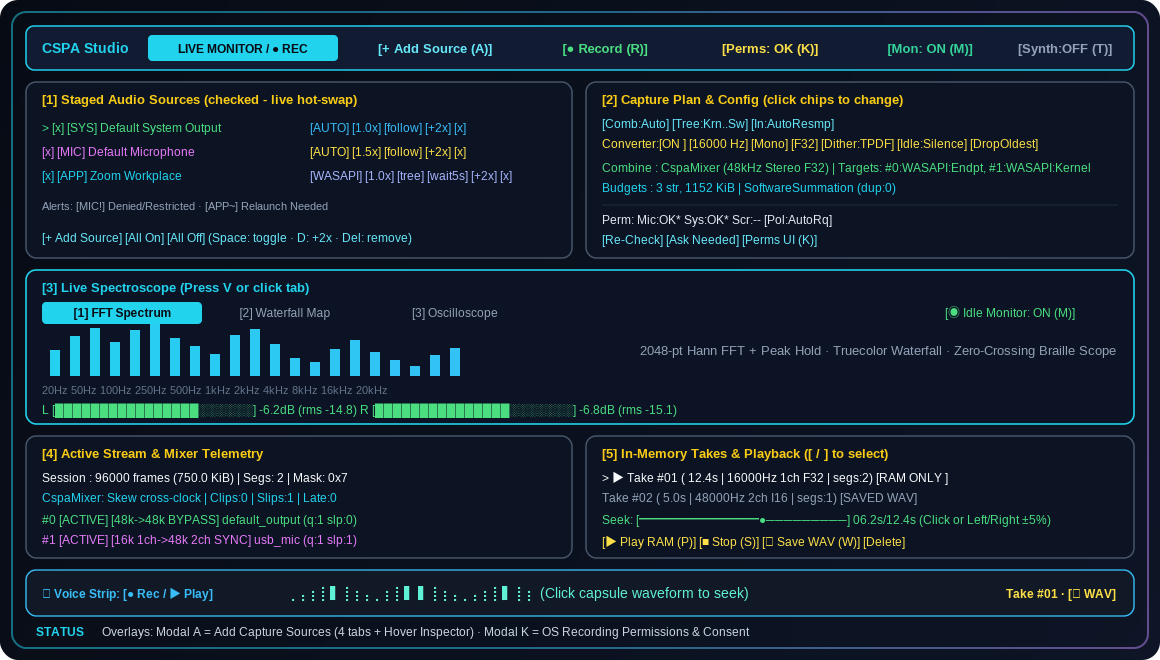
Section titled “2. Annotated 7-Zone Studio Screen Map”Click the diagram below to zoom in:
| Screen Zone | Primary Role | Key Hotkeys |
|---|---|---|
| Top Header Bar | Session state pill (LIVE MONITOR, ● REC, ▶ PLAY, ■ IDLE), [+ Add Source], [● Record], aggregate [Perms] pill, [Mon], and [Synth] test-tone generator. |
|
Panel [1] Staged Audio Sources |
Live mixing board with hot-swap checkboxes, [SYS]/[DEV]/[APP]/[PID]/[MIC]/[IN] badges, and per-target Backend, Gain, Scope, Exit, Device Mode, & +2x Duplicate chips. |
|
Panel [2] Capture Plan & Config |
Clickable session strategy & OutputConverter chips, live CaptureRequest::inspect() readout, and inline Mic/Sys/Scr Permissions Strip. |
|
Panel [3] Live Spectroscope |
Real-time FFT Spectrum (2048-pt Hann + peak hold), Waterfall Map, and Braille Oscilloscope + 20Hz–20kHz log ruler & stereo Peak/RMS dBFS meters. |
|
Panel [4] Stream & Mixer Telemetry |
Frame/byte/segment counters, CspaMixer clock-domain skew & drift-slip counters, and per-input BYPASS / SYNC normalizer & participation badges. |
Live Readout |
Panel [5] In-Memory Takes & Playback |
Zero-disk MemoryTake list (segs:N), clickable Seek: progress bar, cpal playback, and on-demand ./recordings/ WAV export. |
|
Bottom 💬 Voice Strip & Status Bar |
Interactive capsule waveform (click anywhere on the waveform to seek playback!), quick Record/Play & WAV save buttons, and live status/error banner. | Mouse Click |